
This section is for contributors working inside the Referenta monorepo. The root README.md is the short version — clone, install, run. This section is the long version: it explains how product changes move from isolated local development to reviewed production delivery, and why the workflow is shaped the way it is.
Repository Layout
Referenta is a Turborepo-managed monorepo. The high-level shape is:
See Architecture for what each app and service does, what port it runs on, and which ones the root pnpm dev orchestrates together. The repo root supabase/ directory is the only supported Supabase CLI project.
Environment Model
Referenta uses a structured Supabase workflow with clear separation between local work, shared validation, and the live product. There are four environments in play:
- Local — Supabase CLI + Docker on your machine.
- Shared hosted dev — the existing hosted Supabase project (
rieddfnddpsbdlmmalwk) for manual development and shared testing. Not auto-promoted. - Staging — auto-deployed from the
devbranch. - Production — auto-deployed from the
mainbranch.
dev is the only branch that deploys to staging. main is the only branch that deploys to production.
Local
Local development runs through the Supabase CLI and Docker. Each developer can start a full Supabase stack on their own machine, including the database, authentication, storage, and APIs.
Product impact:
- developers can experiment safely without changing shared data,
- schema changes can be validated before the team sees them, and
- iteration is faster because local reset, seeding, and testing are under the developer's control.
Technical impact:
- the repo root
supabase/directory is the supported Supabase CLI project, - local schema work is generated into migrations,
- the dashboard can be pointed at
http://127.0.0.1:24321, and - local-only test users are created during reset for role-based testing.
Shared Validation
After local work is ready, migrations move into shared hosted environments for integration and team validation.
In practice, the repo distinguishes between:
- shared hosted development for linked remote work and manual testing,
- staging as the remote validation layer for approved
devbranch changes, and - production as the live environment used by customers.
This separation keeps collaboration predictable: local work stays isolated, while staging becomes the place where the team validates the same migration history together.
Production
Production only receives stable changes that have already been reviewed and validated. Direct edits in the dashboard or ad hoc schema changes are avoided in favor of committed migrations.
That gives Referenta:
- a traceable database history,
- repeatable environment setup,
- lower production risk, and
- clearer operational ownership over what changed and why.
Deploy Automation
Four systems collaborate to ship changes; each owns one slice and they don't overlap:
- GitHub Actions (
.github/workflows/ci.yml) validates pull requests and pushes tomain. It runs builds, type checks, Biome quality, vitest, the Playwright e2e suite (runs only on the Release Candidate PR and blocks there — day-to-day PRs skip it), Presidio service tests, and migration hygiene checks (filename pattern, duplicate timestamps, stray files). It also creates the release tag + GitHub Release when aRelease Candidate:/Release:PR merges intomain. CI does not deploy anything; there are no longerdeploy-dashboard.ymlorpreview-dashboard.ymlworkflows. See Continuous Integration for the full job-by-job breakdown and Release Automation for the release flow. - Vercel deploys
apps/dashboardandapps/wwwdirectly through its GitHub integration. Every open PR gets a preview deploy,devdeploys to staging,maindeploys to production. No GitHub Actions workflow is involved in dashboard or marketing deploys. - Referentautomat is the org-owned GitHub App that handles PR hygiene and the release handover: area labels, Linear attachment, Release Candidate title validation, the pre-RC audit, and the drafted release notes. It writes to pull requests and cuts the release tag under its own identity, but it deploys nothing. See Referentautomat.
- Supabase Branching deploys database migrations end to end. Every PR against
devautomatically gets a preview Supabase branch,devis connected to the Supabase staging branch, andmainis connected to production. Migrations don't go through GitHub Actions — Supabase manages the branching and apply flow on its side.
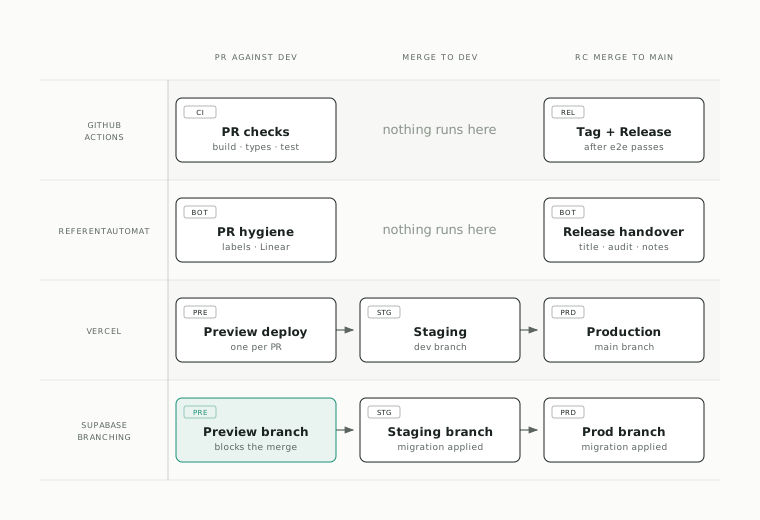
At a glance, the chain is:
- Preview — opening a PR against
devproduces a Vercel preview deploy and a Supabase preview branch. The Supabase preview validates that your local schema is in sync with the migration history; if your local DB has drifted, the preview fails to provision and the check on the PR goes red. Resolve it before requesting review (see Database Workflow for what drift looks like). dev— merging a PR rolls Vercel staging forward and applies the migration on the Supabase staging branch.main— merging an RC PR rolls Vercel production forward and applies the migration on the Supabase production branch.
Direct pushes to dev should be avoided when the change contains schema files — dev is connected to staging, and bypassing the PR loop bypasses the preview-branch validation that catches drift before staging gets a bad migration. See Git Workflow for the full direct-push rule.
Migration-First Workflow
The expected progression is:
- Build and test locally with the Docker-managed Supabase stack.
- Generate or sync migrations from the local schema changes.
- Commit those migrations into the repo.
- Apply and validate them in shared remote environments.
- Promote reviewed changes through staging and then production.
This is both a product workflow and an engineering guardrail. Product-wise, it prevents unreviewed infrastructure drift. Technically, it makes the repo history the source of truth for database evolution. See Database Workflow for the schema file layout and standard migration commands.
Contributor Setup
Prerequisites
Make sure you have the following installed:
- Node.js 24.x
- pnpm 12.8.1 — pinned by
packageManagerin the rootpackage.json;corepack enablegets you the right version - Vercel CLI, for
pnpm env:pull - Docker, for the local Supabase stack and the supporting services
The Supabase CLI and Turborepo are workspace devDependencies, so pnpm install provides both. Don't install them globally — a global version that drifts from the pinned one is a source of confusing schema and build differences.
No POSIX shell is required. Everything pnpm dev orchestrates runs on Node, so Windows needs neither Git Bash nor WSL on PATH. This matters because bash on a stock Windows box resolves to C:\Windows\System32\bash.exe — the WSL launcher — and inside WSL the Supabase CLI is a Windows npm shim that Linux can't exec. Any package script that shells out to bash or sh will fail there, so keep new scripts on Node.
Leave core.autocrlf at whatever Git for Windows set; the repo's .gitattributes pins the working tree to LF and overrides it. It has to: a CR byte makes a #!/bin/bash shebang unrunnable (the kernel looks for an interpreter whose name ends in CR), it breaks the services/*/entrypoint.sh files that get COPYed into the Linux service images — they fail at container start, not at build — and it makes Biome flag every file in the repo. If you cloned before .gitattributes landed, refresh the working tree once with git add --renormalize . followed by git checkout -- ..
Clone And Install
git clone https://github.com/Referenta/referenta
cd referenta
git checkout dev
pnpm install
The dev branch is the default starting point because staging deploys from it and most active work lands there first.
Environment Variables From Vercel
To run the applications locally you'll need the hosted environment variables from Vercel.
- Link the local repository to the Vercel project:
vercel link --repoThis command will guide you through connecting the monorepo to the corresponding project on Vercel.
- Pull the development environment variables:
pnpm env:pullThis downloads the development environment variables from Vercel and creates .env files in the respective application directories.
Local Supabase Setup
Use the root supabase/ directory as the only supported Supabase CLI project for this repo. Bringing up a local stack is two commands:
pnpm db:start
pnpm db:reset
pnpm db:reset applies the committed migration history, runs the seed files, and creates the local-only test accounts. Password for all of them: Referenta!2024#
| Role | Use it for | |
|---|---|---|
role0-user1@local.referenta.test | Member | Non-privileged paths |
role1-user1@local.referenta.test | Admin | Most work — the default |
role2-user1@local.referenta.test | Superadmin | Organization management |
logout-user1@local.referenta.test | Admin | Nothing — reserved for the e2e logout spec |
These accounts exist only in the local Docker-managed Supabase stack. They are not used for shared dev, staging, or production. Leave logout-user1 alone: signOut() defaults to global scope and revokes every refresh token on the account, which invalidates the persisted sessions the Playwright suite runs against.
Onboarding does not involve pulling a schema baseline. The migration history is already committed to supabase/migrations/, so pnpm db:reset is all a fresh clone needs. Running pnpm db:pull against hosted dev manufactures a duplicate baseline and creates exactly the drift the Supabase preview-branch check exists to catch — see Database Workflow.
Linking Hosted Dev (Optional)
Only needed to push migrations to, or generate types from, the shared hosted dev project — not for local development:
pnpm supabase:login
pnpm supabase:link:dev
This links the repo to shared dev project rieddfnddpsbdlmmalwk, and requires a logged-in Supabase CLI session plus the remote database password.
Point The Dashboard To Local Supabase
pnpm dev does this for you. The root script orchestrates @referenta/supabase, which starts the local Supabase stack and writes apps/dashboard/.env.development.local with the local Supabase URL, keys, and supporting service endpoints. Next.js picks the file up on the next start, so a fresh clone needs no manual env wiring to point the dashboard at local Supabase.
The auto-generated file contains:
- The four Supabase keys (
NEXT_PUBLIC_SUPABASE_URL,NEXT_PUBLIC_SUPABASE_ANON_KEY,NEXT_PUBLIC_SUPABASE_PUBLISHABLE_KEY,SUPABASE_SERVICE_ROLE_KEY), read fromsupabase status -o env. - URLs for the supporting services
pnpm devalso starts:UPSTASH_REDIS_REDIS_URL,XBERG_BASE_URL,PRESIDIO_BASE_URL,GOTENBERG_BASE_URL.
The file is marked # Auto-generated by supabase/dev.mjs at the top and gets rewritten every time pnpm dev boots. Don't hand-edit it. Persistent local overrides belong in apps/dashboard/.env.local, which still wins over .env.development.local in Next.js precedence.
Wiring The Dashboard Without pnpm dev
If you'd rather run the dashboard alone (pnpm dev:dashboard) without spinning up the rest of the local services, start Supabase yourself and provide the env manually. Copy apps/dashboard/.env.local.example to apps/dashboard/.env.local, then fill the Supabase values from pnpm db:status:env:
API_URL->NEXT_PUBLIC_SUPABASE_URLANON_KEY->NEXT_PUBLIC_SUPABASE_ANON_KEYPUBLISHABLE_KEY->NEXT_PUBLIC_SUPABASE_PUBLISHABLE_KEYSERVICE_ROLE_KEY->SUPABASE_SERVICE_ROLE_KEY
This same approach is how you selectively override individual keys from the auto-written file, for example pointing one service URL at a remote host while the rest of the stack stays local.
Env File Precedence
A normal local checkout has several env files coexisting. Next.js loads them in this order, highest priority first:
.env.local(persistent local overrides, always wins except in test mode)..env.development.local(whatpnpm devauto-writes, points at local Supabase plus local services)..env.development.env(whatpnpm env:pullwrites, holds the hosted dev credentials from Vercel).
In practice:
- Fresh clone after
pnpm dev:.env.development.localexists and beats.env, so the dashboard hits local Supabase automatically. .env.localoverrides everything else. Use it sparingly, only for keys you specifically want to change.- Restart matters. Next.js reads env at process start. After editing
.env.local, deleting.env.development.local, or re-runningpnpm env:pull, restart the dev server before expecting changes to take effect. - Verify the wiring. The first Supabase request in your browser's network tab should hit
127.0.0.1:24321. If it's hitting the hosted host, the dev server didn't pick up the auto-written file; restart and check that.env.development.localexists.
To switch the dashboard back to remote Supabase: delete apps/dashboard/.env.development.local and don't re-run pnpm dev (which would recreate it). Next.js falls back to .env from Vercel.
.env, .env.development.local, and .env.local are all gitignored, so none of them leak into the repo. But .env still contains hosted dev credentials even when the dashboard is pointed locally. Be careful copying values out of it for one-off shell commands like psql; those will hit shared Supabase, not your local stack.
Run The App
Start the full local stack with:
pnpm devThis boots local Supabase (and auto-writes apps/dashboard/.env.development.local), the dashboard, www, docs, and the supporting Docker services in parallel. The dashboard is served on http://localhost:3000. See Architecture for the full list of apps, ports, and what each filter starts.
If you only need the dashboard and have already wired up the env manually (see Wiring The Dashboard Without pnpm dev), run:
pnpm dev:dashboardpnpm dev only stops the Supabase containers it started; if Supabase was already running (for example via pnpm db:start), it stays running after Ctrl+C. pnpm db:stop cleans up leaked containers after a hard exit.
Troubleshooting The Local Stack
pnpm db:start fails to bind a port
failed to start docker container "supabase_db_referenta": ports are not available:
exposing port TCP 0.0.0.0:24322 -> 127.0.0.1:0: listen tcp 0.0.0.0:24322:
bind: An attempt was made to access a socket in a way forbidden by its access permissions.
That wording (Windows) or bind: permission denied (macOS/Linux) means the OS
is refusing the bind, not that another program holds the port — so hunting
for the offending process with netstat finds nothing.
The local stack uses ports 24320–24329 precisely to avoid this. Ports above
49152 are the OS ephemeral range; on Windows the Hyper-V NAT service that
Docker Desktop and WSL2 install reserves random blocks out of it at every boot,
which is why Supabase's stock 543xx defaults break intermittently and then fix
themselves after a reboot. On Windows you can list the current reservations:
netsh interface ipv4 show excludedportrange protocol=tcpIf a reservation ever overlaps 243xx, move the block in supabase/config.toml
to another range below 32768 rather than reserving ports by hand — and update
the port table in Architecture plus
apps/dashboard/.env.local.example to match.
The dashboard still talks to port 54321
apps/dashboard/.env comes from pnpm env:pull, so it carries whatever
NEXT_PUBLIC_SUPABASE_URL is stored in the Vercel development environment.
pnpm dev overrides it by writing .env.development.local from the live
supabase status, but pnpm dev:dashboard on its own does not. Delete
.env.development.local and re-run pnpm dev, or set the URL explicitly in
.env.local, which outranks both.
The Logs tab in local Studio is empty
Expected. [analytics] is disabled in supabase/config.toml, so neither
Logflare nor its vector log shipper starts. Vector ships container logs by
talking to the Docker daemon over TCP, which Docker Desktop only exposes if you
turn off its TLS protection — a Windows-only workaround that grants any local
process root-equivalent Docker access, for a feature nothing in the app reads.
A healthy local stack is ten containers, none of them restarting. Read a
service's logs directly:
docker logs supabase_auth_referentaLeaked containers after a hard exit
pnpm dev only stops the Supabase containers it started. Run pnpm db:stop to
clean up anything left behind.
Included Pages
Commands
Reference the current monorepo and Supabase workflow commands.
Git Workflow
Branch hygiene against dev, when direct pushes are allowed, and why Release Candidate branches stay stable.
Delivery Pipeline
An interactive map of how code reaches production — branch, PR checks and previews, staging on dev, the Release Candidate gate, and the automated release on main.
Database Workflow
See how declarative schemas in supabase/schemas/ become migrations and how they reach hosted environments.
Continuous Integration
What ci.yml validates on every PR, the gate-and-concurrency pattern, and a job-by-job breakdown.
Release Automation
See how release tags and release notes are generated from merged Release Candidate pull requests.
Referentautomat
The GitHub App that labels pull requests, keeps them attached to Linear, audits the Release Candidate, and drafts the release notes.