
Git Workflow
Branch hygiene for working against dev — how to start a feature/fix branch from the latest dev, keep it in sync, and open a PR without disrupting Release Candidate branches.
Referenta uses dev as the integration branch and main as the production branch. Feature and fix work flows through short-lived branches cut from dev and opened as pull requests back into dev. Following the conventions on this page keeps Release Candidate branches stable and minimizes merge conflicts across the team.
The Role Of dev
dev is effectively a staging / Release Candidate branch. The next Release Candidate PR is a diff from dev to main that contains everything accumulated on dev since the last release, so anything merged into dev is implicitly committing to ship in the next RC.
Concretely:
- Anything merged into
devshould be RC-ready. Treat the merge as a soft promise: the work is review-complete, doesn't depend on follow-up work that isn't also landing, and is safe to ship to production from the next release. - Long-running work in progress stays on its own branch. A feature that is only half-finished, or a refactor that is waiting on a downstream API to stabilize, should not be merged into
dev"to keep it in the loop." The moment incomplete work lands indev, the next RC PR inherits it and is blocked until that work is either finished or reverted. - A blocked
devblocks everyone. Other feature and fix branches that were genuinely ready to ship can't reach production while unfinished work sits in the RC. Avoid being the reason an RC stalls — other people's small, reviewed changes shouldn't have to wait on a long-standing in-progress branch you weren't ready to ship.
If you have a long-standing branch that needs to stay alive without merging into dev, keep it in sync with dev periodically (see When dev Moves Ahead Of Your Branch). Open the PR only when the work is genuinely complete and reviewed.
Standard Flow
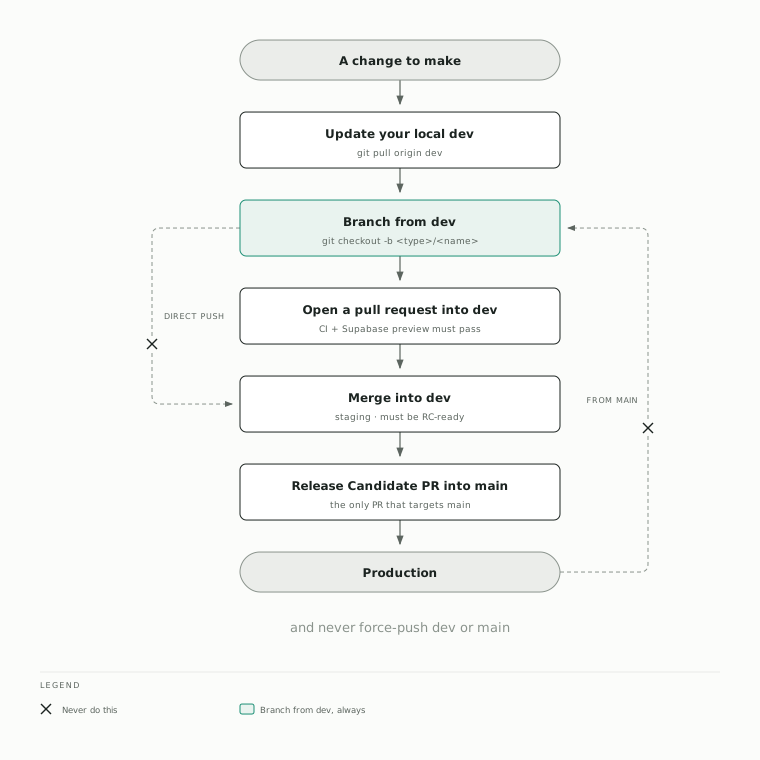
Update your local dev branch
Before starting any new work, make sure your local dev is up to date with the remote:
git checkout dev
git pull origin dev
Skipping this step is the most common cause of avoidable conflicts later.
Create your feature/fix branch from dev
Branch only from the just-updated dev. Don't branch from main, and don't branch from another in-flight feature branch.
git checkout -b <type>/<short-description>Common branch name shapes: feat/..., fix/..., docs/..., chore/..., refactor/....
Open a pull request back to dev
When the branch is ready, open a PR targeting dev. Reviews, CI, and preview deploys all assume dev as the merge target.
PRs always target dev, never main. The only PR that targets main is the Release Candidate PR cut from dev, which is produced as part of the release process. See Release Automation for how RC PRs work and what their title format must be.
What Referentautomat Checks On Your PR
Referentautomat reviews every pull request for the conventions on this page and reports what it finds in a single comment that updates itself as you push. Three of its checks are the ones you will meet day to day:
- Area labels are applied for you, from the paths your diff touches. They are add-only, so a label you added by hand is never removed.
- A missing Linear issue gets flagged, with likely candidates to pick from.
If your description already names a ticket but is not attached to it, the bot
writes the
Refline that attaches it. It never creates an issue for you. - A wrong base branch gets flagged. Targeting
mainfrom anything other thandevis the case above, and the bot tells you to retarget rather than retargeting the PR itself.
Read the comment, not the check. The bot's run shows up in your PR's check list and stays green whether or not it found anything, because a finding is reported in the comment rather than by failing the job. The comment is deleted once there is nothing left to report, so a PR with no bot comment on it is clear. None of these findings is a required check, so none of them block a merge.
Handing A Bug Or Chore To Referentautomat
Not every fix needs an engineer's hands. A bug with clear steps, or a chore
that is well defined, can be filed as a GitHub Issue with the Bug or
Chore form. The bot triages it, and once you apply the referentautomat
label it drafts a fix as a draft PR into dev that follows every rule on
this page: branched from fresh dev, Conventional Commits with the REF-N,
Linear attached, area labels applied.
Treat that draft like a colleague's PR. Read the evidence it cites, mark it ready when it holds up, merge it. The bot never marks its own PR ready and never touches the database, auth, billing, dependencies, or its own code; the full policy is in Referentautomat.
When dev Moves Ahead Of Your Branch
If dev advances while your branch is open — most visibly on Release Candidate PRs, where the diff against dev keeps growing — bring the latest dev into your branch:
git pull origin devResolve any conflicts locally, commit the resolution, and push. The PR updates automatically. Avoid letting a stale branch sit far behind dev: the longer the gap, the more likely conflicts compound.
Direct Pushes To dev
Direct pushes to dev should only be used for very small and urgent fixes — a typo correction in a copy string, an immediate hotfix to an obviously-broken deploy. Everything else opens a PR.
Never push directly to dev when the change includes schema changes — anything under supabase/migrations/ or supabase/schemas/. dev is connected to the Supabase staging branch, so a direct push moves the migration straight into staging without the Supabase preview-branch validation that catches drift. Always open a PR for schema changes, even small ones. See Database Workflow.
The recommended default is always:
- Update local
dev. - Create a feature/fix branch from
dev. - Open a PR back to
dev.
If a change is too small to need a feature branch but you find yourself hesitating, that hesitation usually means it should go through a PR after all.
Direct pushes are also visible later. The pre-RC audit lists every commit that
reached dev without a PR, so an undiscussed direct push shows up on the
Release Candidate with your commit subject next to it.
Be Careful With Git History
Git history on shared branches is a team contract. Rewriting it shifts other people's branches off their expected base, which is particularly painful on Release Candidate PRs that have already been reviewed against a specific commit.
Avoid force pushing whenever possible. Never force-push to dev or main. If you absolutely must force-push your own feature branch (for example to squash local commits before review), make sure no one else has pulled from it first, and prefer --force-with-lease over --force.
Specifically:
- Never force-push to
devormain. - Avoid amending commits that have already been pushed; create a follow-up commit instead.
- If you need to rewrite history on your own feature branch, do it before the first push.
Why This Workflow Matters
Following this flow keeps Release Candidate branches stable and minimizes merge conflicts across the team. The single most common source of cross-team pain — RC PRs spiraling into hard-to-resolve conflicts — is upstream feature branches getting created off stale dev and then needing forced re-bases late in the cycle. The cost of a git pull origin dev at the start is much lower than the cost of untangling that later.