
Database Workflow
How declarative schemas in supabase/schemas/ become migrations and how those migrations reach hosted environments.
The Referenta database is managed declaratively. supabase/schemas/*.sql is the desired-state source of truth, and supabase/migrations/ is the generated deployment history that gets pushed to hosted environments.
In other words: you edit the schemas, you generate migrations from them, and the migrations are what actually run against shared dev, staging, and production.
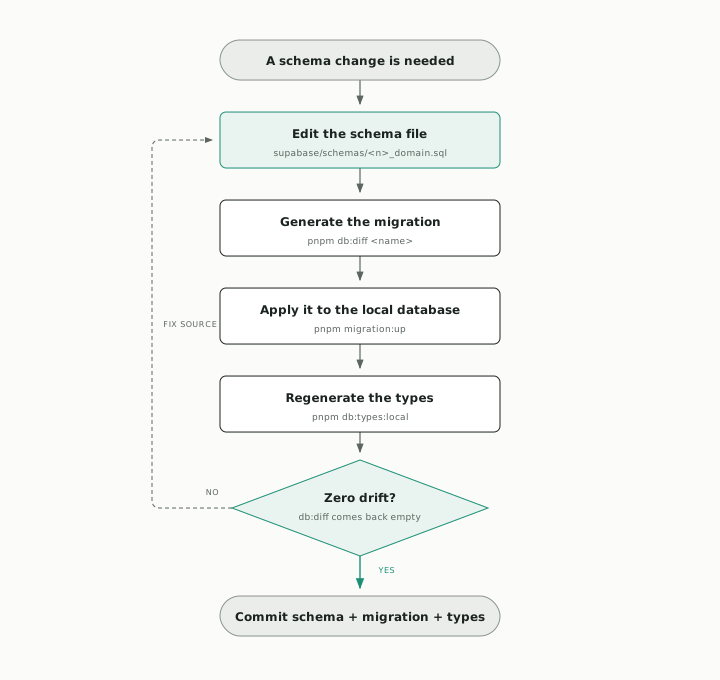
db:diff has nothing left to say. Anything else is drift, and it gets fixed in the schema file, not in the migration.Prefer the generated migration: files in supabase/migrations/ come from pnpm db:diff. Hand-writing or hand-editing one is allowed only when db:diff can't express the change safely — and only if you mirror the same change into supabase/schemas/ so a follow-up pnpm db:diff produces an empty diff (zero drift). The schema stays the source of truth; the migration must converge to it. Full rules and rationale live in supabase/migrations/README.md.
Schema File Layout
Schema files are split by product domain so it's clear which file owns which feature:
00_extensions.sql— Postgres extensions loaded first.01_shared_types.sql/02_shared_functions.sql— types and functions reused by every product.10_shared_core.sql— shared core tables and primitives used across products.20_assistant.sql— Assistant product schema.30_research.sql— Research product schema.31_research_collaboration.sql— Research workspace collaboration: per-workspace membership, external share links, and the Yjs document update log.40_knowledgebase.sql— Knowledgebase product schema.45_org_knowledge.sql— Org Knowledge product schema: organization-wide knowledge spaces, their files, and RAG chunks (org-scoped counterpart to Research).50_contactbase.sql— Contactbase product schema.60_press_monitor.sql— Press Monitor product schema.70_projects.sql— Projects product schema.80_support.sql— Support product schema.90_admin.sql— admin tooling tables (audit log forapps/admin).
The numeric prefix controls load order. Keep new tables, columns, and policies in the file that matches their product domain instead of creating new top-level files.
Schema load order is declared explicitly in supabase/config.toml under [db.migrations].schema_paths, not discovered from the filesystem. Adding a new schema file requires adding it to that list — otherwise pnpm db:diff will silently miss it and generate a migration that drops everything in the missing file. When you add supabase/schemas/<n>_thing.sql, add a matching ./schemas/<n>_thing.sql entry to schema_paths.
RLS Lives With Its Table
Keep Row Level Security policies in the same schema file as the table they protect. This makes ownership obvious and prevents a policy from drifting away from the table definition.
Avoid leaving table or policy changes only in the Supabase dashboard. If something was changed there to unblock work, bring it back into the corresponding supabase/schemas/ file so the repo stays the source of truth.
Standard Flow
The day-to-day database change flow is:
pnpm db:diff my_change
pnpm migration:up
Step by step that means:
- Edit the matching file in
supabase/schemas/. - Run
pnpm db:diff <name>to generate a migration file insupabase/migrations/. - Run
pnpm migration:upto apply pending migrations to the local database. - Regenerate TypeScript types with
pnpm db:types:localif the schema changed. - Commit both the updated schema file and the generated migration.
How Changes Reach Hosted Environments
Database migrations are deployed through Supabase Branching, not through GitHub Actions. The chain is preview → staging (dev) → main (production), and each step is gated on the previous one:
- Preview branch — opening a PR against
devautomatically creates a Supabase preview branch. Supabase scans your local migration history against the remote and provisions a preview database that applies your new migrations on top of the current schema. The preview appears as a status check on the PR; it must pass before merge. - Staging branch — connected to the GitHub
devbranch. Merging a PR intodevrolls the migration forward into the Supabase staging branch. - Production branch — connected to the GitHub
mainbranch. Merging a Release Candidate PR intomainrolls the migration forward into production.
A migration that fails on a preview branch can't reach staging, and a migration that fails on staging can't reach production. The PR is the gate.
Drift Detection
The Supabase preview branch doubles as a drift detector. If your local schema has diverged from the migration history, the preview fails to provision and the PR check goes red. The most common causes:
- You ran
pnpm db:diffto generate a migration but didn't commit it. - You applied a schema change through the Supabase dashboard UI on a hosted environment without bringing it back into
supabase/schemas/. - You hand-edited a migration without mirroring the change back into
supabase/schemas/, so the schema and migration history no longer agree — seesupabase/migrations/README.mdfor when hand-editing is allowed and how to keep it zero-drift.
Fix the divergence at the source (supabase/schemas/), regenerate the migration with pnpm db:diff <name>, push the branch, and let Supabase reprovision the preview.
Never Push Directly To dev With Schema Changes
dev is the staging trigger. A direct push that contains migration files bypasses the Supabase preview validation entirely, which means staging can receive a migration that hasn't been checked against the current schema state. Always open a PR for schema changes, even small ones, so the preview branch runs.
Manual Pushes
pnpm db:push still exists for the rare case where a manual push to a hosted environment is needed — bootstrapping a new project, or applying an emergency fix in coordination with the team. It is not the normal flow. Default to: edit schema → db:diff → PR → let Supabase Branching apply.
When The Remote History Doesn't Match
supabase/migrations/ already contains the full committed history, baselines included. A fresh clone gets its schema from pnpm db:reset — not from a pull. pnpm db:pull writes hosted state into a new migration file, so running it during onboarding duplicates history that is already committed and produces the drift the preview branch then rejects.
The command is for the narrow case where hosted state legitimately diverged from the repo — someone applied a change through the Supabase dashboard, say — and you need to capture it:
pnpm db:pull -- <name>Inspect what it produced before committing, and mirror the change into supabase/schemas/ so the schema stays the source of truth. If the remote migration history doesn't match your local files, repair the linked history first. Don't force-push migration history onto a shared environment to make the error go away — that erases traceability for everyone else.
Quick Command Reference
pnpm db:stop
pnpm db:pull -- <name>
pnpm db:reset
pnpm db:diff <name>
pnpm db:push
pnpm migration:new -- <name>
pnpm migration:up
pnpm db:types:dev
pnpm db:types:linked
pnpm db:types:local
See Commands for what each one does and when to reach for it.