
Admin App
Operator Next.js app for managing things in hosted dev and prod Supabase that the dashboard intentionally doesn't expose — Google Workspace sign-in, a per-operator permission allowlist, a two-tier dev→prod promotion flow and an audit trail.
apps/admin is a small Next.js app that manages configuration data that lives in Supabase but isn't safe to expose in the customer-facing dashboard — currently the Assistant model whitelist and user management (/users: search, create, edit, delete, and trial-reset users across hosted dev/prod), and any future cross-environment toggles. It is built to be hosted for the organization behind three fail-closed layers: an edge identity proxy (Cloudflare Access), Google Workspace sign-in through a self-hosted Hanko instance (services/hanko), and a per-operator permission allowlist on prod (admin_operators). The decision, the review findings and the deployment checklist live in docs/adr/0002-admin-app-hosting-and-operator-access.md.
It runs on port 3069 and is started with:
pnpm --filter admin devWhy it's a separate app
The dashboard is wired to a single Supabase project per environment: locally it points at 127.0.0.1:24321, in CI / preview / staging / production it points at the matching hosted project. Admin tooling needs the opposite shape — it must read and write to hosted dev and hosted prod from your laptop, side by side, so an operator can stage a change in dev, eyeball it, and then promote the same change to prod with a visible diff. Putting that capability inside apps/dashboard would either pollute its env namespace or force conditional UI that's easy to leak. Splitting the surface fixes both problems.
apps/admin holds the prod service-role key. It may only be deployed as its own Vercel project with the environment described in the ADR checklist, behind Cloudflare Access, and never with ADMIN_AUTH_MODE set. Preview deployments must be disabled or protected.
Access model
Every request passes three gates:
src/proxy.ts— a Hanko session token that verifies offline againstNEXT_PUBLIC_HANKO_API_URL's JWKS (issuer and audience pinned) is required for everything except/login. API calls without one get401, pages redirect to/login.- Operator resolution (
src/lib/auth/session.ts) — the session is confirmed live with Hanko's/sessions/validate, must have been created through Google (amr=ext:google), with a verified e-mail from the Workspace domain (ADMIN_ALLOWED_EMAIL_DOMAIN), and the e-mail must have an enabled row in prodadmin_operators. - Permissions —
requireOperator(request, permission)opens every route handler and also enforces a same-origin check on mutations; pages calloperatorForPage(permission); the sidebar lists only readable sections.
| Permission key | Grants |
|---|---|
assistant.models:read | View the whitelist (dev and prod) |
assistant.models:write-dev | Save to dev, sync dev from prod |
assistant.models:apply-prod | Apply to prod |
users:read | View users and organizations (dev and prod) |
users:write-dev | Create / edit / delete / reset-trial on dev |
users:write-prod | Create / edit / delete / reset-trial on prod |
operators:manage | The Access page: add, edit, disable, remove operators |
audit:read | Audit log page: read prod changes |
Read is implied by any write permission of the same section. Day to day, a superadmin (ADMIN_SUPERADMIN_EMAILS; full access, needs no row, not editable from the UI) uses the Access page: add a colleague by work e-mail, choose one level per section (hidden / read / read + write dev / full), disable or remove later. Adding creates the person's Hanko sign-in account through the admin API. The same from a terminal:
pnpm --filter admin add-operator -- --email anna@referenta.de --name "Anna" --permissions users:read,users:write-devRevoke with SQL against prod: update public.admin_operators set enabled = false, updated_at = now() where email = 'anna@referenta.de';
For local development set ADMIN_AUTH_MODE="local" in .env.local: sign-in is skipped and ADMIN_OPERATOR_EMAIL acts with every permission. The switch is ignored in a production build.
Two-tier state model
The Assistant model whitelist keeps three layers of state:
- Client local — what the operator is editing in the browser.
- Hosted dev — the staged truth, written by "Save".
- Hosted prod — the live truth, only updated by an explicit "Apply to prod" action.
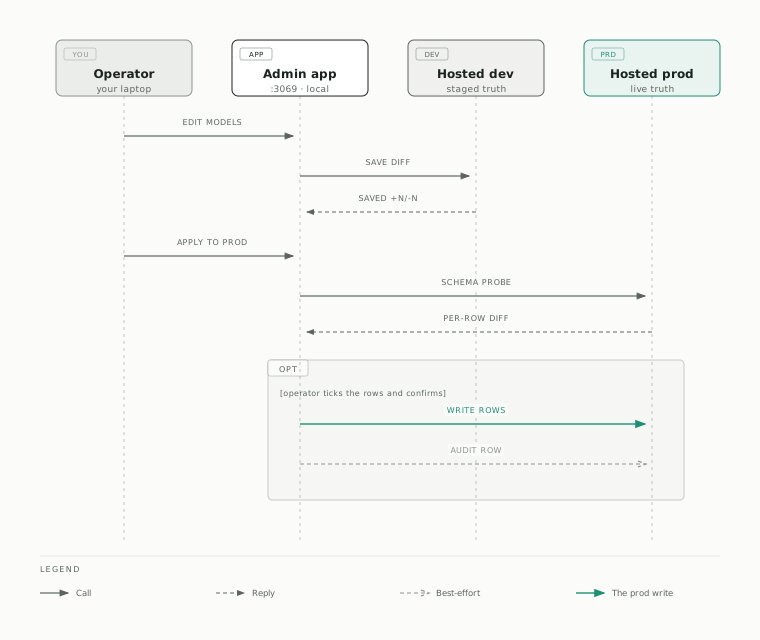
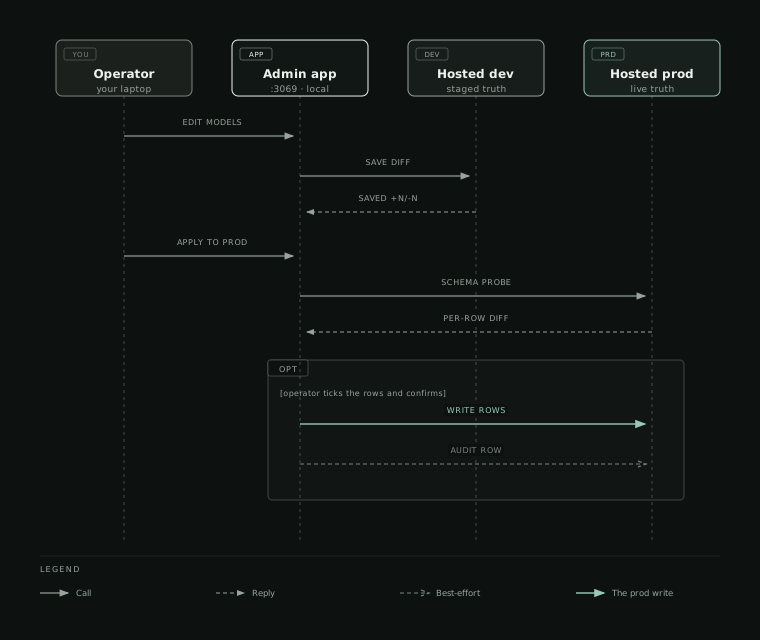
The promotion flow is deliberately friction-y: client edits land in dev first, then a modal shows a precise per-row diff against prod, the operator confirms, and only then does the write hit prod. That gives you a chance to spot mistakes before they go live, and produces a meaningful audit row (see Audit log).
/users doesn't use this staged pattern — it switches between hosted dev and hosted prod directly and writes CRUD operations straight to whichever one is selected, with no client-local diff or promotion step. Mutations against prod still land in the same audit log.
Environment setup
Admin reads two parallel sets of Supabase credentials — one for hosted dev, one for hosted prod — plus the public URL of the Hanko instance for sign-in. The project URLs go through Referenta's custom domains rather than the raw *.supabase.co hosts, so they are not secret and live in apps/admin/.env; the service-role keys and the local-mode switch live in apps/admin/.env.local (gitignored):
# apps/admin/.env
SUPABASE_DEV_URL="https://sb-dev.referenta.de"
SUPABASE_PROD_URL="https://sb.referenta.de"
NEXT_PUBLIC_HANKO_API_URL="https://auth.admin.referenta.de"
HANKO_JWT_AUDIENCE="referenta-admin"
ADMIN_ALLOWED_EMAIL_DOMAIN="referenta.de"
ADMIN_APP_URL=""            # https://admin.referenta.de when hosted

# apps/admin/.env.local
SUPABASE_DEV_SERVICE_ROLE_KEY=...
SUPABASE_PROD_SERVICE_ROLE_KEY=...
ADMIN_AUTH_MODE="local"     # dev laptops only
ADMIN_OPERATOR_EMAIL=you@referenta.de
pnpm --filter admin dev runs tsx scripts/bootstrap-env.ts first, which reads your git user email and writes ADMIN_OPERATOR_EMAIL into .env.local if it's missing (used for audit attribution in local mode only; hosted, the signed-in operator is used). Service-role keys are not auto-fetched — pull them from the Supabase dashboard for each project once and keep them out of files that get synced anywhere.
The service-role keys grant unrestricted access to each Supabase project. Keep apps/admin/.env.local on your machine only; it is gitignored, but don't paste those keys into Slack, shared notes, or chat with cloud assistants.
Dev → prod promotion flow
The day-to-day operator flow for the model whitelist:
Edit in the browser
Open the admin page (e.g. /assistant/models), make changes. Changes are kept as a client-local state diff against hosted dev — nothing is written until you press Save.
Save to hosted dev
Pressing Save writes the diff to the hosted dev Supabase project and shows a toast with the +N adds / -N removes counts. State now reads from dev as the source of truth; further edits compare against this.
Review the prod diff
The "Apply to prod" button glows red / yellow / green based on how far hosted prod has drifted from hosted dev. Clicking it opens a modal with a per-row checkbox diff against prod, plus a pre-flight schema probe that flags any table-missing / column-missing issues before the write.
Confirm and apply
Tick the rows to promote (default: all), confirm. The selected ops are written to the hosted prod Supabase project. Failed rows surface inline with a retry-failed handler. Success / partial / failed status is recorded to the audit log.
Audit log
Every prod write — whitelist applies and user mutations — writes a row into admin_apply_log on the prod project, attributed to the signed-in operator's e-mail. The table is declared in supabase/schemas/90_admin.sql:
CREATE TABLE "public"."admin_apply_log" (
    "id" uuid PRIMARY KEY DEFAULT gen_random_uuid(),
    "operator_email" text NOT NULL,
    "section" text NOT NULL,
    "resource_table" text NOT NULL,
    "op_count" integer NOT NULL,
    "op_summary" text NOT NULL,
    "details" jsonb NOT NULL,
    "status" text NOT NULL CHECK (status IN ('success', 'partial', 'failed')),
    "error_details" jsonb,
    "applied_at" timestamptz NOT NULL DEFAULT now()
);
Operators with the Audit log access level (audit:read) read it on /audit: newest first, filtered by section, status, period and a search over the operator and summary, with each entry described in plain language and its raw details one click away. The descriptions come from apps/admin/src/lib/audit-log/describe.ts, one describer per section; an unknown shape falls back to the stored op_summary. Outside the app, inspect it with any prod-credentialed Supabase client, or with supabase db remote ... against the prod project ref. The audit write is best-effort — if it fails, the apply still succeeds and a warning logs to the admin console — because losing the actual prod change to a flaky audit insert would be the wrong tradeoff.
Build and lint hygiene
next.config.tssets the security headers (CSP withframe-ancestors 'none', HSTS, nosniff, no-referrer). Extendimg-src/connect-srcthere when a new external host is genuinely needed instead of loosening the policy.- There is no nested
apps/admin/biome.json— root config wins. Don't reintroduce one; it conflicts with lefthook + biome at the workspace level. - React, Next, and Sonner versions in
apps/admin/package.jsonmust matchpackages/ui. A mismatched React or Sonner copy will produce a runtime singleton split (toasts silently fail to render).